Home About Experience Projects Case studies Resources Articles Briefs Playbook Tools FAQ How we start Security Get in touch

Case studies

Four times the work came off the plate and stayed off

Real work from real employers, written the way I would tell it in an interview: the result first, then what I walked into, what I built, and where it went wrong.

Four times the work came off the plate and stayed off, and one hiring assessment is shown end to end. Employer names are here because they are the evidence; client names and figures are not, because they are theirs, and the assessment firm and brand are renamed for the same reason.

Case study 01

The project operations system I built inside Jira

WherePlan Left LLC, Nashville digital agency
RoleSenior Executive Assistant, 2024 to 2026
Scale133 automation rules, 70 live, most on schedules; a ScriptRunner layer; 9 Apps Script integrations
StackJira Automation, ScriptRunner, Google Apps Script, Slack, Tempo, Structure PPM, Fireflies

A digital agency running 15+ client accounts stopped hand-creating its work. Onboarding, website builds, campaigns, monthly and quarterly deliverables, meetings, holidays, PTO, and QA gates now generate themselves, on schedule, with the right checklist attached.

When I arrived, every recurring piece of work was created by a person remembering to create it. Client onboarding epics, website process checklists, monthly advertising and reporting tickets, weekly syncs, holiday coverage, QA hand-offs: all manual, all inconsistent, all landing late in busy weeks.

I built it in three layers.

Jira Automation. Templated epics that fan out into full checklists (a website build-out generates its five-phase checklist; a new contract generates the onboarding epic), scheduled rules that create each month's and quarter's deliverables from the client roster, sprints created nine weeks out, and Slack alerts for overdue tickets, stale QA, and mentions.

ScriptRunner. A daily 8 AM stand-up DM to each person with their blocked, in-progress, overdue, and due-today tickets in a ready-to-post format, and validation that a ticket has a sprint, an assignee, and a due date before it can slip through.

Google Apps Script. Intake forms for PTO and client support that create Jira tickets and Slack notifications, calendar events and meeting transcripts synced into Jira, and ticket-health monitoring that flags or reschedules stale work. Two Make.com workflows were retired along the way. Project charters, timelines, and SOPs ran on the same rails, with timelines in Structure PPM over Tempo.

What went wrongRules breed. At one point there were 133 of them and fewer than half were live; the rest were experiments, copies, and superseded versions nobody had cleaned up. I wrote the inventory, named every rule by what it does, and disabled the dead ones. A system nobody can read is not a system, it is a liability with a schedule.

A quarterly client reporting package that took hours to days to reconcile and build by hand now runs on a schedule, and leadership gets a weekly utilisation report without asking for it.

One client asked for the same reporting package every quarter: numbers pulled from several systems, reconciled by hand, assembled from scratch, always landing in the same weeks as everything else. Leadership had a parallel version of the problem: they wanted to know billable hours per client and burn against contracted hours, and getting it meant someone pulling Jira and Tempo by hand.

The tell was the repetition. I stopped treating either as a task and built both as systems: the quarterly package generated as scheduled Jira work with the numbers assembled by script, and a weekly client utilisation report in Google Apps Script that fetches Jira and Tempo, calculates billable hours and burn rate per client, and produces the summary for leadership. Both produce what was actually asked for, not a generic export.

What went wrongVersion one was built for the report I assumed they wanted, not the one they kept asking for. I rebuilt it against the actual request. Automate what is asked for, not what is easy to automate.

Case study 02

The client reporting that stopped costing days

WherePlan Left LLC
RoleSenior Executive Assistant, 2024 to 2026
CadenceWeekly utilisation to leadership; monthly and quarterly client deliverables on schedule
StackGoogle Apps Script, Jira, Tempo, QuickBooks, Stripe, Google Sheets

Case study 03

From books nobody trusted to a monthly close and a 12-month projection

WherePlan Left LLC
RoleSenior Executive Assistant, finance and operations, 2024 to 2026
OutputMonthly close, 12-month projection with per-month detail, subscription tracker with daily QuickBooks sync
StackQuickBooks Online, Stripe, Google Sheets, Google Apps Script

Leadership went from not knowing whether a given month was profitable to a monthly financial report, a 12-month projection built line by line from the client roster, and a live view of where the overhead was going.

The books were messy enough that leadership could not say with confidence whether the company was making money in a given month. Roughly $150,000 a month was flowing through QuickBooks and Stripe, but categorisation, reconciliation, and reporting had not kept up with it.

First, tracking: I brought the transactions current, categorised them, and started producing a monthly report leadership could actually read. Then, projection: using prior-year expenses as the baseline and current expenses, overheads, and the client roster (who was renewing, who was near expiration), I built a 12-month projection with a per-month transaction view underneath it, so every projected line traced back to a client, a contract, or a recurring cost. Alongside it, a subscription cost tracker synced daily from QuickBooks against a monthly spend target, because tooling was where the leaks were.

What went wrongI owned this on top of a full executive-support desk, and for a stretch I was the only person who could run it. That is a single point of failure, and I know it because I built a tool that flags exactly that. The fix was documentation and a daily automated sync so the numbers refresh without me in the loop.

Websites, mobile apps, and web AR/VR experiences for agency clients whose end brands included Google, Starbucks, HBO Max, Coachella, Pizza Hut, TextNow, and Yuga Labs, delivered start to finish with scope, cost, and quality held through launch.

International teams, agency timelines, and a client on the other end who cared about the launch date more than the process. I owned each project from scoping to launch: features broken into user stories with acceptance criteria, the backlog, budget and change control, cross-functional teams and vendors, and the method chosen to fit the job (Agile, Scrum, or Waterfall) rather than the other way round.

QA and data hygiene were part of it, including deduplicating and cleaning records before anything shipped. The client and project list is on the Projects page.

What went wrongNot every project fit the method it started with. The ones that hurt were the ones where I stayed with a process past the point it was serving the client. I got faster at switching, and slower to promise a date before scope was written down.

Case study 04

Thirty-plus digital projects, scoping to launch, over four years

WhereFoxhole QA
RoleProducer / Project Manager, 2020 to 2023
Delivered30+ projects end to end
StackJira, Agile / Scrum / Waterfall, user stories and acceptance criteria, budget and change control, vendor management, QA

Case study 05

A 48-hour hiring assessment, run like a real project

WhereHiring assessment for a US food and beverage consulting firm; company and brand names changed
RoleCandidate project, completed solo, under 48 hours
Scale67-response survey cleaned and coded; 16-task launch plan across 3 phases and 16 weeks; 9-slide analytical deck
StackExcel (formula-driven summary), PowerPoint, backward scheduling and dependency mapping

Two cold-start deliverables in one weekend: a messy 67-response consumer survey turned into a formula-driven summary and a nine-slide report, and a September 30 beverage launch mapped backward into a 16-task, dependency-coded timeline with the critical path made visible.

The brief was a consulting firm's new-hire assessment, and it looked like real client work on purpose: one raw survey export and one page of launch constraints, nothing else. I treated it as a project, not a test.

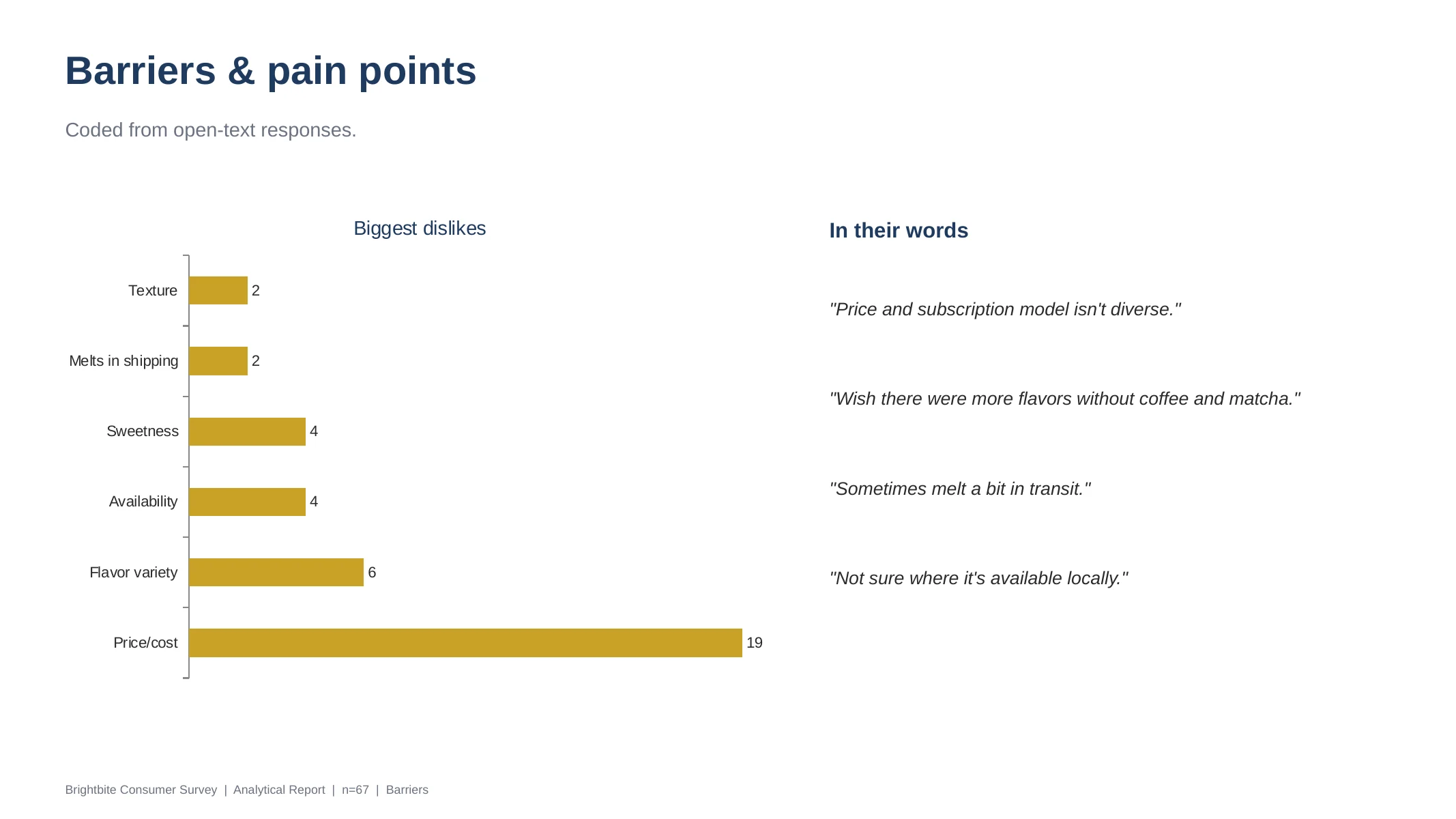
The messy part first. The export arrived with unnamed columns, headers buried in row two, multi-select answers scattered across nine columns, and free-text complaints ranging from "too dense" to a paragraph about sweeteners. I rebuilt it as a clean Data sheet, then added one derived column that coded every open-text dislike into themes (Price/cost, Sweetness, Texture, Availability, Melts in shipping). That single coding step is what turned 67 opinions into a rankable barrier list.

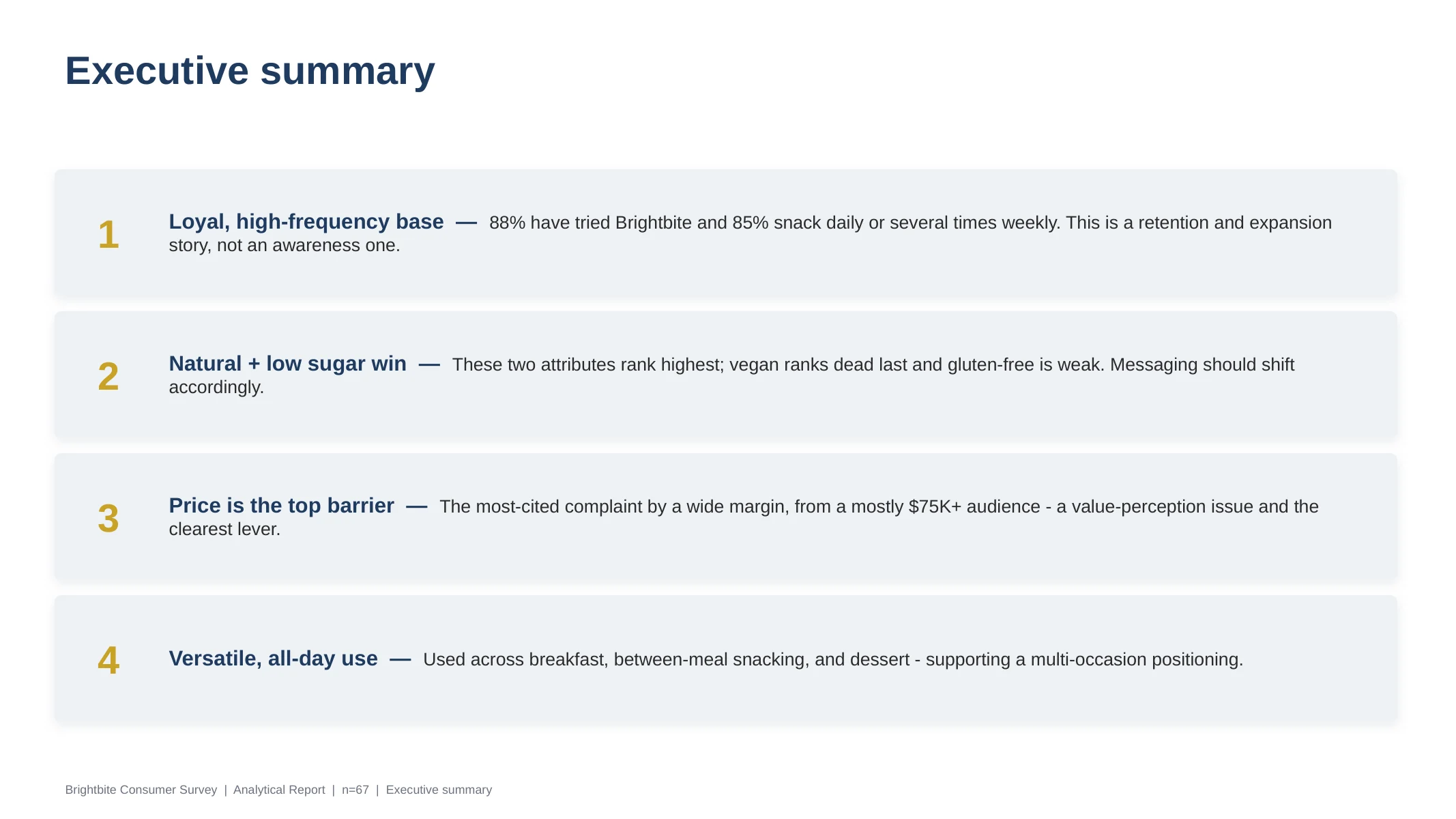
The summary that computes itself. The Summary tab holds no typed numbers: every count is a COUNTIF against the Data sheet and every percentage divides off those counts, so correcting one response upstream re-states the whole analysis. Findings held up: 88% had tried the brand, price was the top barrier by a wide margin (19 of 45 coded complaints), natural ingredients and low sugar ranked as the attributes that matter, and vegan ranked dead last.

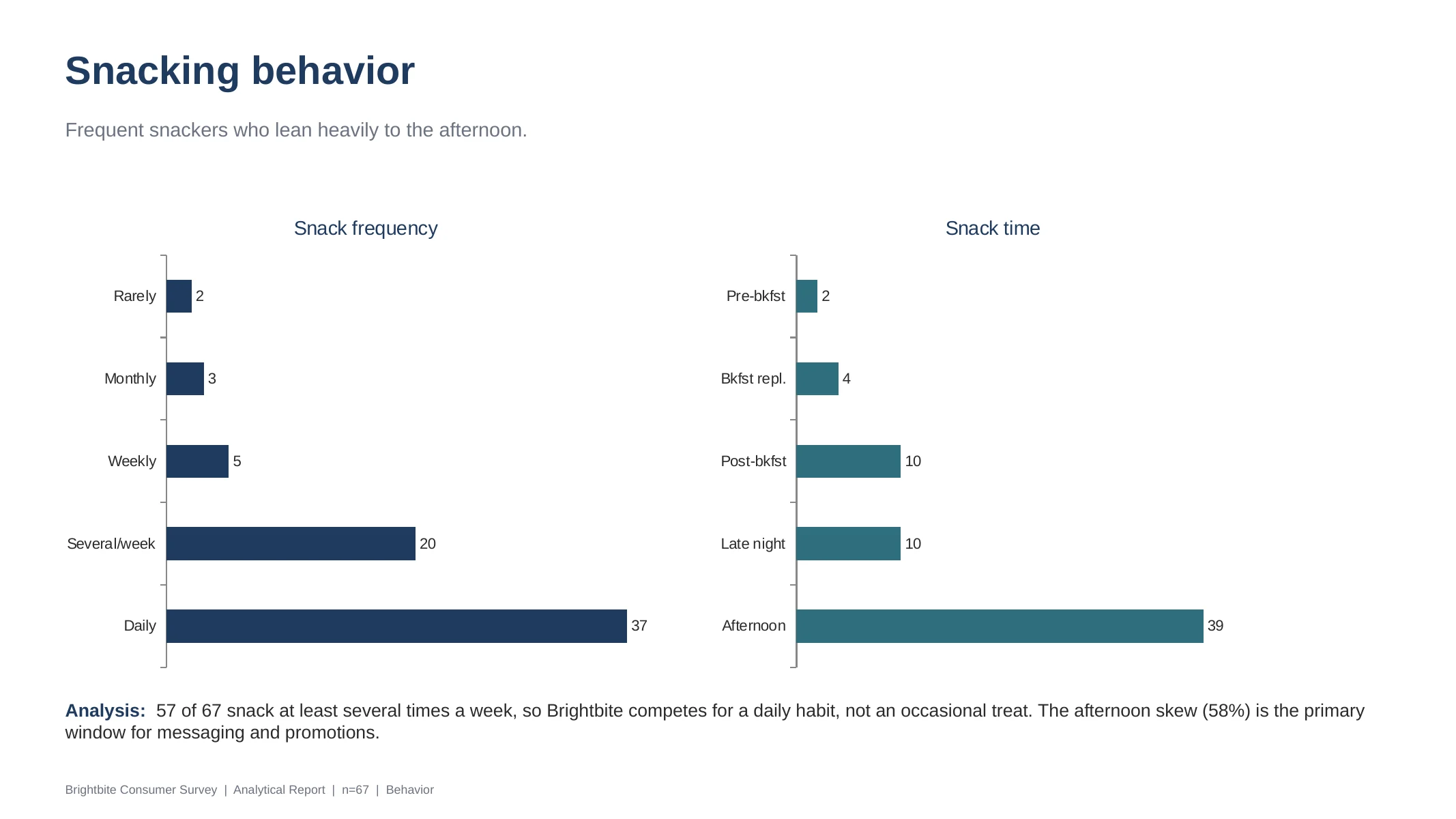
How often do you snack? (Summary sheet, live counts)
CategoryCount%
Daily3755%
Several times a week2030%
Weekly57%
Monthly34%
Rarely23%
Total (responses)67
=COUNTIF(Data!$A$2:$A$68,"Daily")  then  =B5/67  (no typed numbers anywhere)
Biggest dislike (derived theme coding, top of 10)
CategoryCount%
Price/cost1928%
Other1116%
None/Positive69%
Flavor variety69%
Sweetness46%
Availability46%
=COUNTIF(Data!$W$2:$W$68,"Price/cost")  against the derived coding column
Executive summary slide: four numbered findings on loyalty, winning attributes, price as top barrier, and multi-occasion use Snacking behavior slide with frequency and time-of-day bar charts Barriers and pain points slide: coded dislikes bar chart led by price, with verbatim quotes

Click any slide to preview it full size; the links below download the real workbooks and deck.

Then the launch plan, built backward. The second brief gave a target date, lead times, and phase rules, and asked one question: how would you manage this? I anchored on September 30 and scheduled backward, which surfaced the real headline: the required start was June 15, about fifteen weeks out, with almost no slack. The plan orders the long-lead cans and cartons first and in parallel, overlaps artwork approval with validation, runs the 2,400-can trial into the fixed four-week approval gate, and tucks full-run procurement inside that gate so the 400,000-can run lands the week before launch. Every task carries an owner function, a T-coded dependency, and a critical-path flag; the Gantt bars are painted by those codes.

Milk-Based Beverage Launch - Project Timeline

Target launch: 9/30/2026  |  Required start: 6/15/2026  |  ~15 weeks  |  the PM drives every task; "Executed by" is the function doing the work under the PM's coordination. Rebuilt in code, cell for cell, from the actual workbook.

PhaseTaskExecuted byStartEndLeadDepCritW1W2W3W4W5W6W7W8W9W10W11W12W13W14W15W16
6/156/226/297/67/137/207/278/38/108/178/248/319/79/149/219/28
Phase 1 - ValidationProduct validation: 4-gallon test + lab / process authorityR&D + Quality6/157/124 wk-Yes
Phase 2 - TrialConfirm & approve artwork (cartons + labels)Creative / Brand7/67/121 wk-
Phase 2 - TrialOrder trial CANS (long-lead)Procurement7/138/94 wkT1Yes
Phase 2 - TrialOrder trial CARTONS (long-lead)Procurement7/138/94 wkT2
Phase 2 - TrialOrder trial INGREDIENTSProcurement7/208/93 wkT1
Phase 2 - TrialOrder trial LABELSProcurement7/278/92 wkT2
Phase 2 - TrialTrial production run (2,400 cans)Production8/108/161 wkT3-T6Yes
Phase 2 - TrialSecure trial approval (lab / process authority)Quality / Reg.8/178/231 wkT7Yes
Phase 3 - Full RunImplement trial learningsR&D8/249/62 wkT8
Phase 3 - Full RunOrder full-run CANS (long-lead)Procurement8/249/204 wkT8Yes
Phase 3 - Full RunOrder full-run INGREDIENTSProcurement8/319/203 wkT8
Phase 3 - Full RunOrder full-run LABELSProcurement9/79/202 wkT8
Phase 3 - Full RunAlign with co-packer on schedulingProduction8/319/203 wkT8
Phase 3 - Full RunFinal production run (400,000 cans)Production9/219/271 wkT9-T13Yes
MilestoneLAUNCH (9/30)Marketing9/2810/4-T14Yes
PMCoordinate, track & drive all tasks + weekly status

Critical pathNon-criticalPM coordination Launch

The honest flags shipped inside the file, not hidden: a single supplier slip on cans erases the slack, the four-week approval gate is fixed so a failed trial likely misses the date, and the brief listed cartons for the trial only, an ambiguity I put in writing to confirm rather than silently assume.

And then, the interview itself

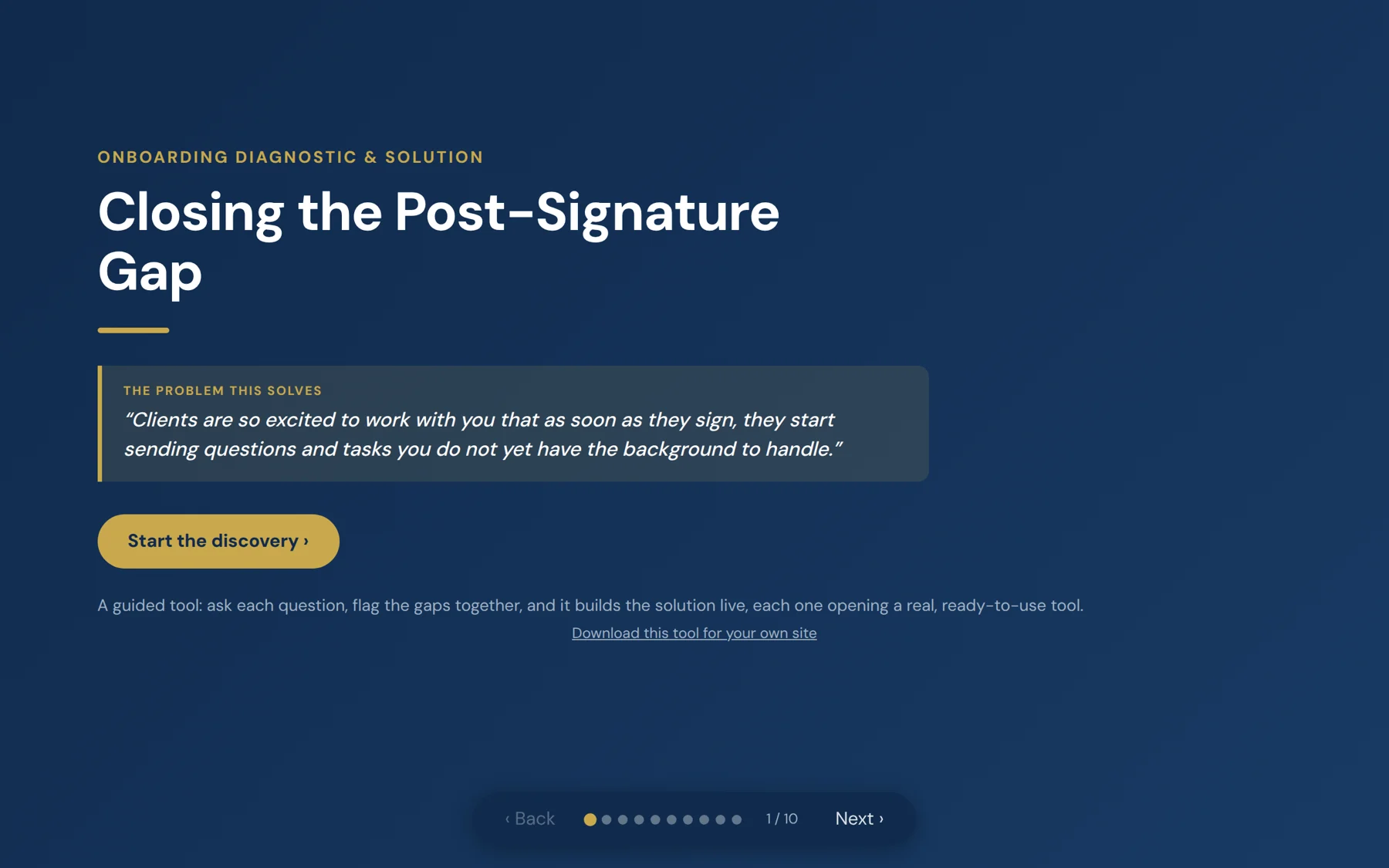
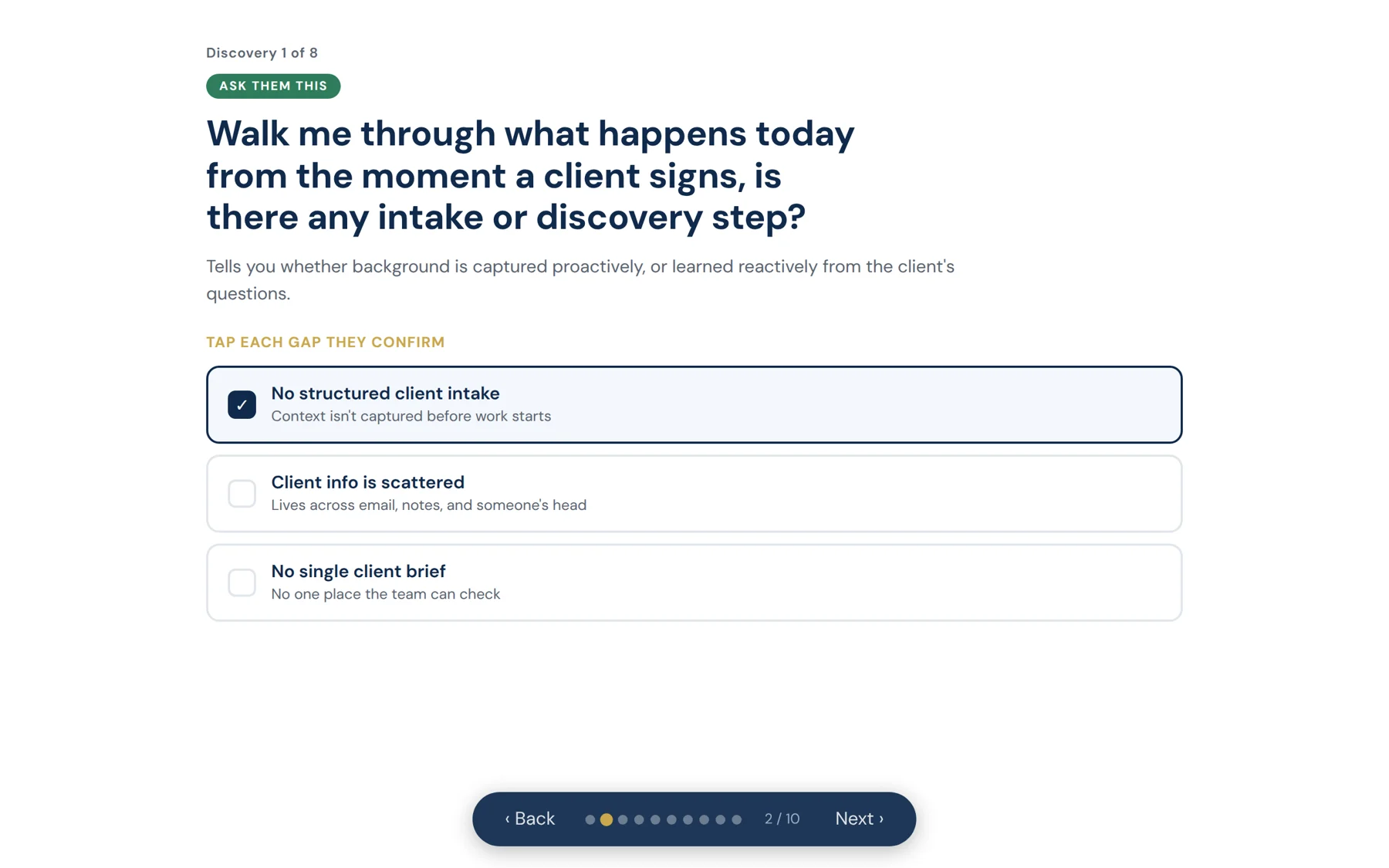
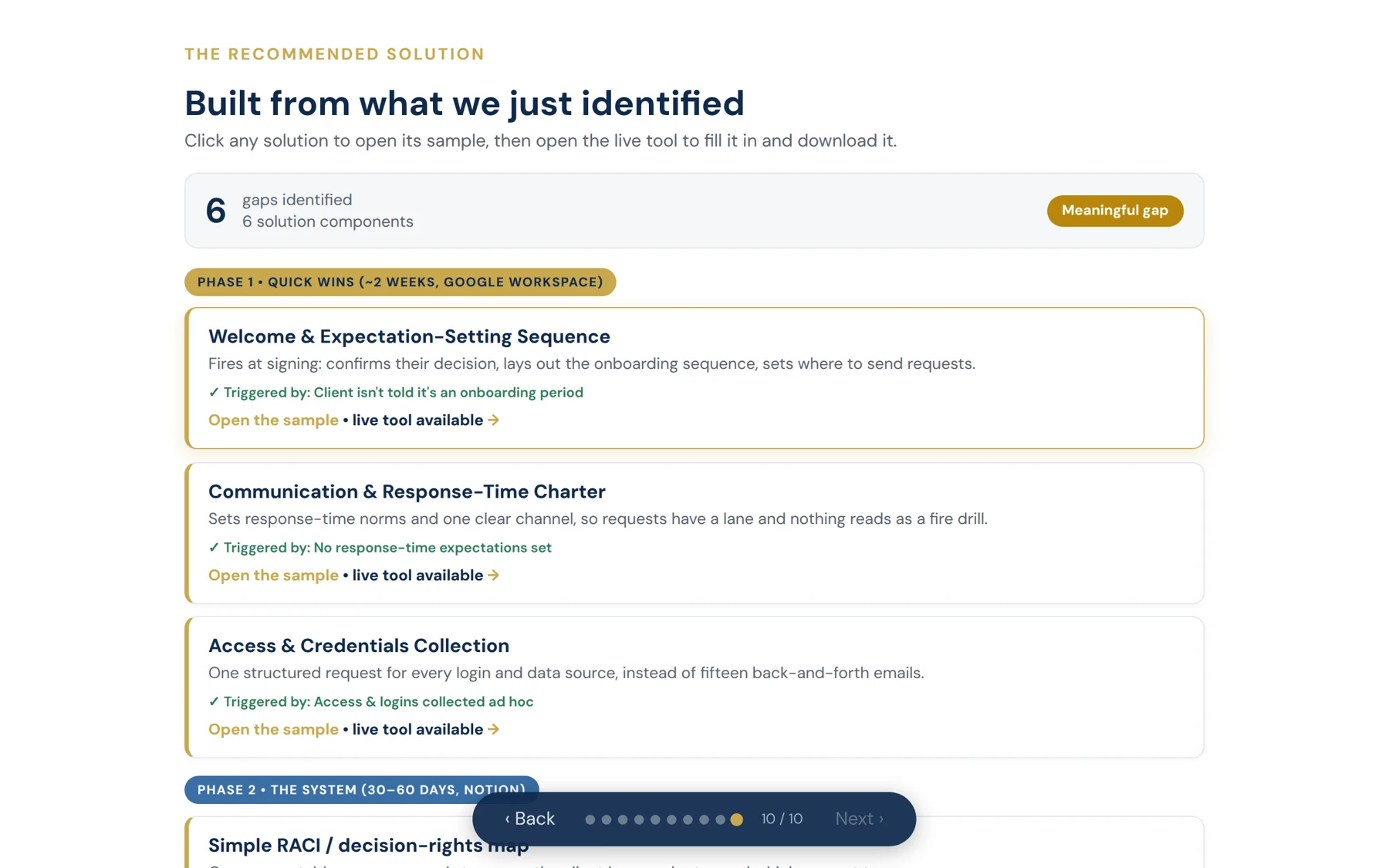
The assessment above was the take-home. For the interview, instead of presenting a memo about their onboarding gap, I built a working diagnostic and ran the call as a working session: it asks the discovery questions, flags the gaps as they answer, and assembles a phased fix live on screen. It ended in an offer on the spot. That tool was later rebuilt and published as the free onboarding toolkit on this site; the full story is in the article and The Working Version playbook.

Title screen of the onboarding diagnostic: Closing the Post-Signature Gap, with the client pain quote and a start button Discovery screen: an ask-them-this question with tappable gap cards, one flagged Results screen: gaps counted, severity badge, and the phased solution built from the flagged gaps

Click any screen to preview it full size, or open the live tool and run the discovery yourself.

The pattern, and the honest part

I say yes to too much, and I have learned what that costs

Operations, finance, hiring, support, executive support, project management, site builds. I have done all of it because I said yes to all of it, and the curiosity behind that is why I can walk into messy books or a stalled reporting cycle and fix it rather than route it. The cost is focus. The version of me you would be hiring scopes the yes: takes the work off the plate, builds the system so it stays off, and hands the rest back with a note on who should own it. The tools on this site are those systems.