An automation that turned recorded calls into tasks showed every run as complete. A count from the source showed about three in four client calls producing nothing. One rule explained the gap, hand cover closed it the same day, and filing moved from whenever someone noticed to same day.
The team recorded its calls, and an automation was meant to file each recording and turn it into tasks on the right client board. It had been live for weeks and its runs completed without errors, so it was trusted. Missed calls surfaced one at a time, each was fixed on its own, and the pattern stayed hidden. Recordings had also stopped reaching the file store, and nobody owned that.
I audited it from the outside, without reading its code.
Count from the source. I listed every recording in a fixed window from the recorder itself, not from the automation's log. A log only shows what the automation tried. The source shows what it should have done.
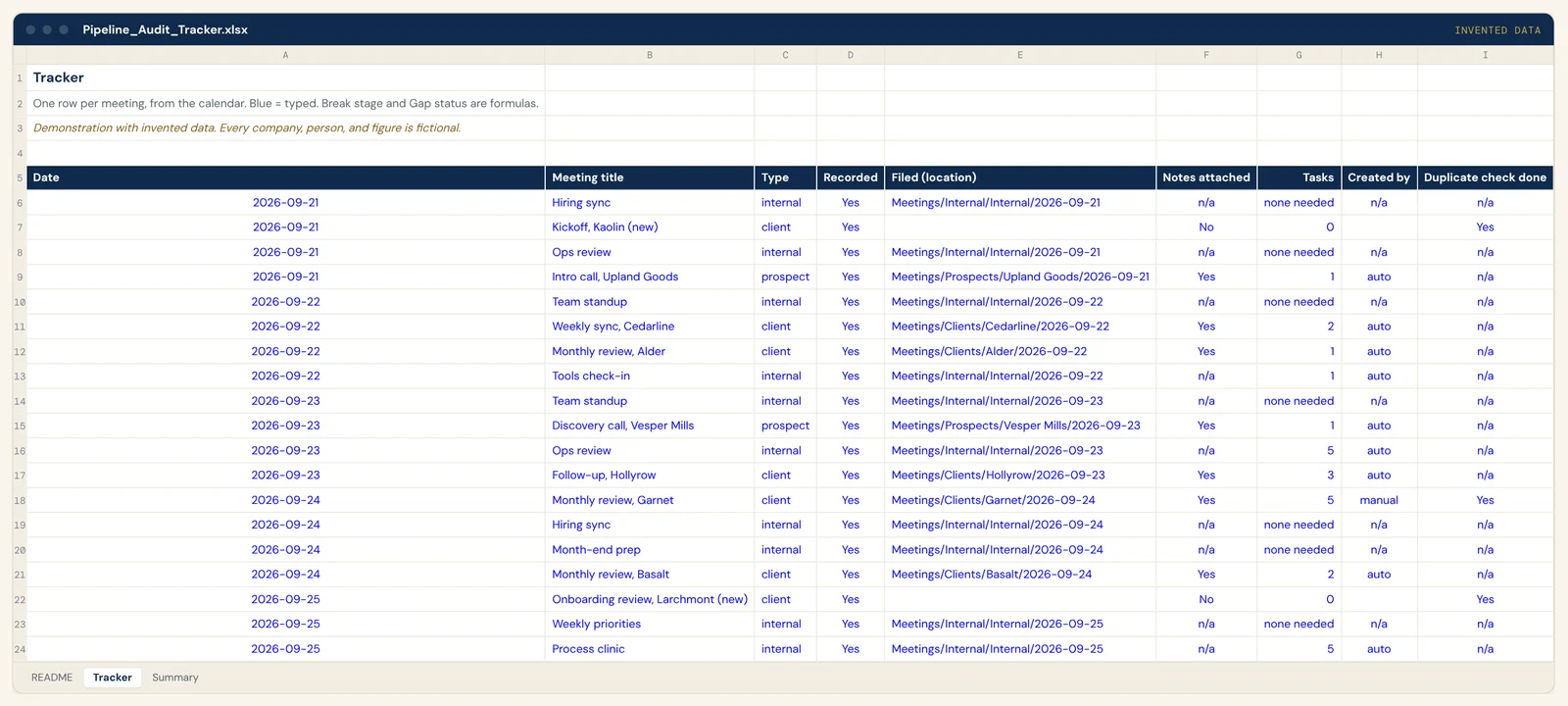
One row per recording, one column per stage. Recorded, filed, indexed, tasks created, and whether each task was made automatically or by hand. Every cell is yes, no or not applicable, with a link to the evidence. A call that needs no follow-up is marked "none needed", so the judgment is visible and never read as a miss.
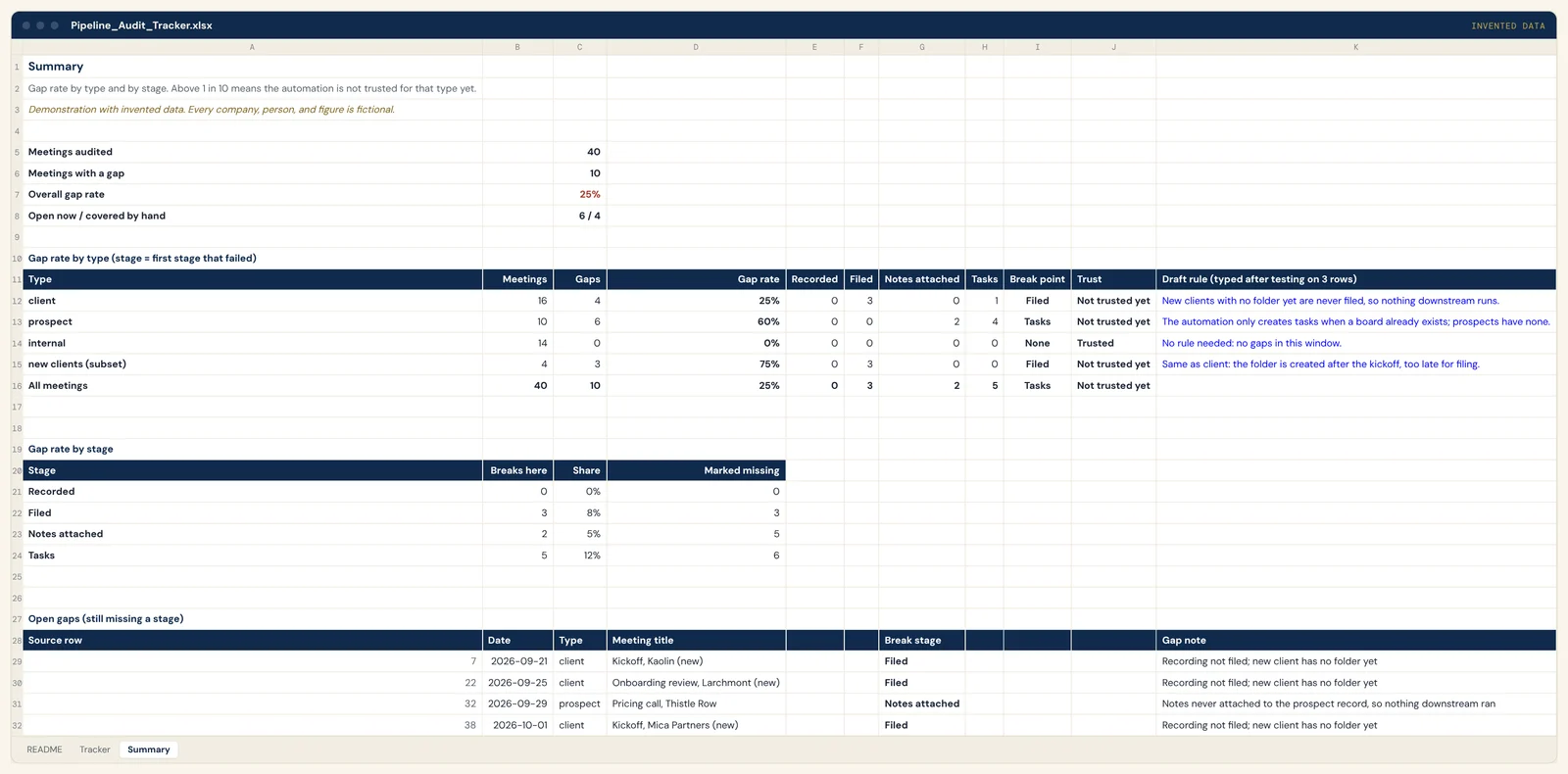
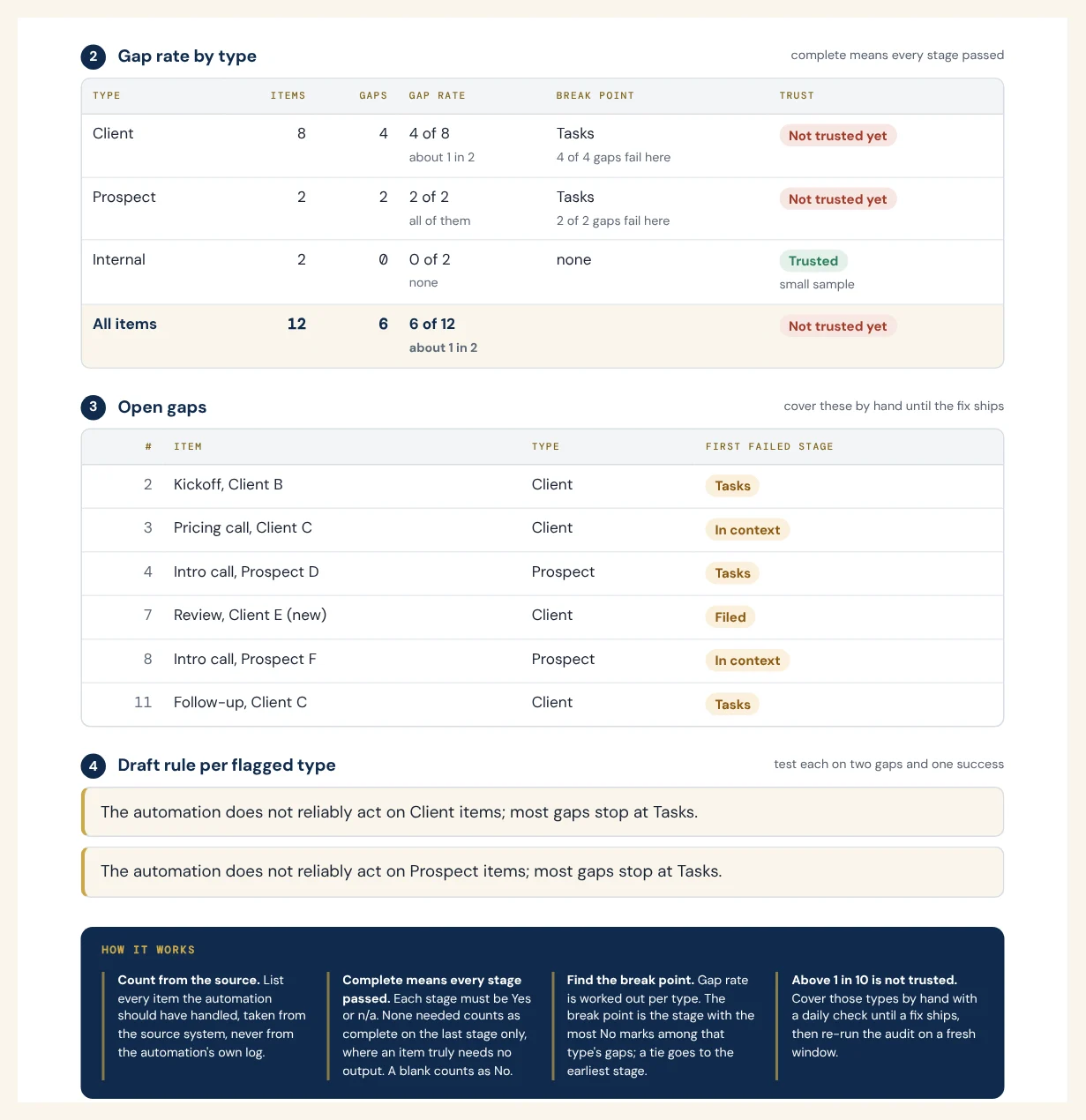
Gap rate per type. Each call was tagged client, prospect, internal or new account. The overall rate blurred the problem. By type it was plain: about three in four client calls produced no tasks, and prospect and internal calls produced none at all.
Pipeline Audit Tracker, Tracker tab (one row per recording, client and prospect calls plus one internal)
| Meeting | Filed | Notes | Tasks | Gap status |
|---|---|---|---|---|
| Weekly sync, Cedarline | Yes | Yes | 2 auto | No gap |
| Hiring sync | Yes | n/a | none needed | No gap |
| Kickoff, Kaolin (new) | blank | No | 0 | Open |
| Monthly review, Garnet | Yes | Yes | 5 manual | Covered by hand |
| Pricing call, Thistle Row | Yes | No | 0 | Open |
| Discovery call, Redfern Supply | Yes | Yes | 0 | Open |
Pipeline Audit Tracker, Summary tab (gap rate by type)
| Type | Meetings | Gaps | Rate | Break | Trust |
|---|---|---|---|---|---|
| client | 16 | 4 | 25% | Filed | Not yet |
| prospect | 10 | 6 | 60% | Tasks | Not yet |
| internal | 14 | 0 | 0% | None | Trusted |
| new clients (subset) | 4 | 3 | 75% | Filed | Not yet |
| All meetings | 40 | 10 | 25% | Tasks | Not yet |
The demo file is invented and set to a milder gap of about 1 in 4 client calls. The real audit found about 3 in 4, with whole call types producing nothing.
The rule behind the gaps. One sentence explained every gap: the automation only acts where a board already exists. New clients, prospects and informal calls fell through without an error. I tested the rule against two gaps and one success, then sent its owner the rule, the evidence rows and the fixes I was asking for: who owns the follow-up, a due date, and a status on creation.
Hand cover, with an end condition. Until the fix shipped, I ran one batch at the end of every shift. Each new recording was filed in the required format, indexed and read for action items. Tasks were created only where someone was asked to do something. Before creating anything, I looked for the automation's own item by its tag, not by keyword, so nothing was made twice. The cover ends when the fix holds on a fresh window, and a dated re-audit task keeps that honest.
Click any image to see it full size. Every file here is rebuilt with invented data.
The results, in bands. The gap was found and covered the same day. A few dozen missed tasks were backfilled by hand. The first audit covered about 100 recordings at roughly 98% filed correctly, and filing moved to same day. The owner got a short spec instead of a stream of complaints.
- The automation's own view showed every run completing, and that was taken as proof it worked. I now count outputs against inputs from the source, never from the tool's log.
- Early misses were handled one call at a time, so nobody saw the rule. A fix request now needs a rule statement and evidence rows first.
- My own filing step saved transcripts in the wrong document format. I re-exported and refiled them in the required format, then changed the step.
Pipeline Audit Tracker (demo workbook)The Pipeline Gap AuditorThe Audit playbook (PDF)Your automation is working. It just isn't doing anything.Live demos of the working filesPart of the work in case study 07
Case study 08